In Tune with Intune: Changes(~10min)
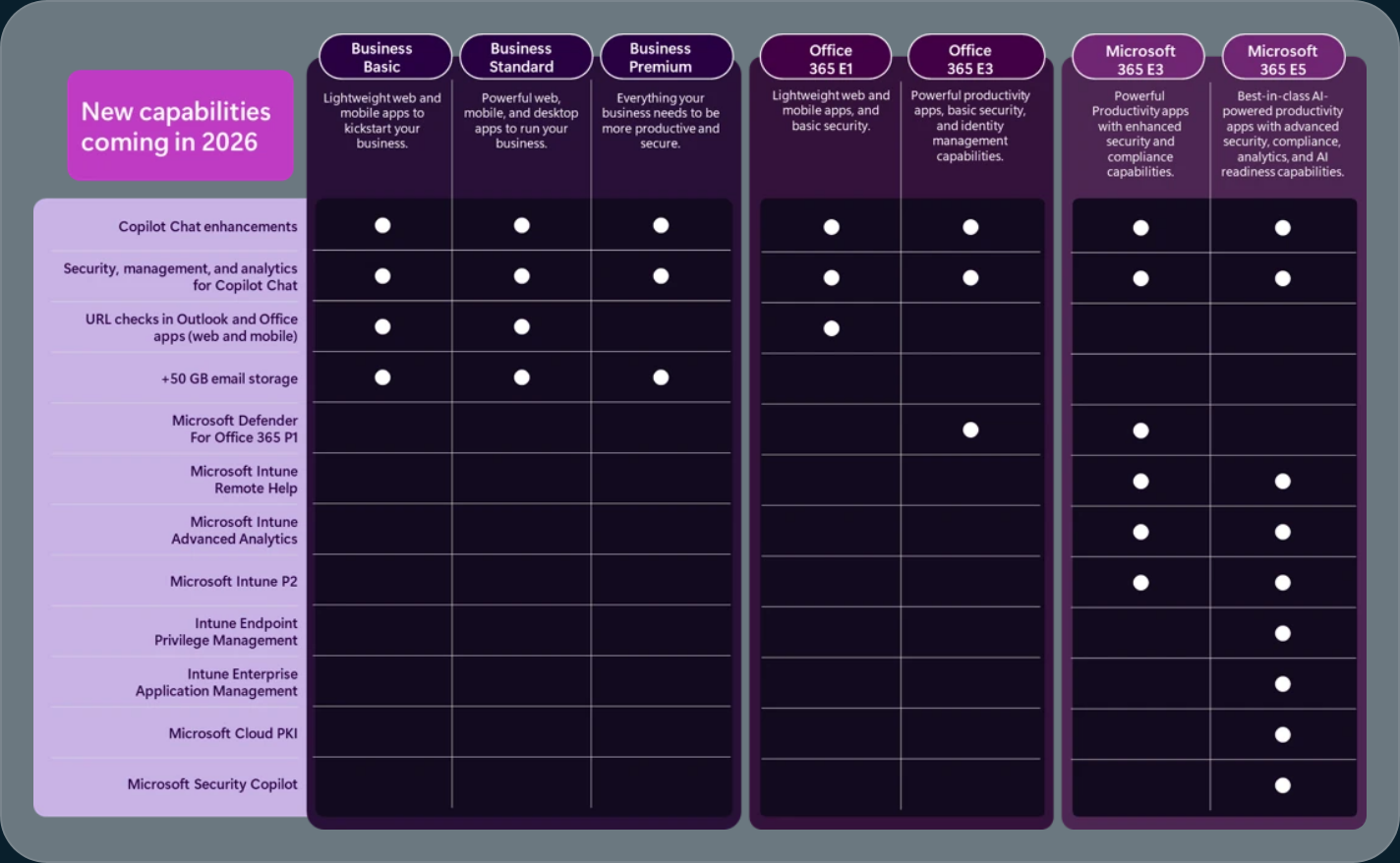
Transcript: We're gonna talk about a couple of things today, specifically on Intune, Microsoft, Intune, definitely. And also, there are some things that we have to talk about, like the roadmap for Intune, and what has changed. So back in December of 2025, there is an article that I'm going to uh, link in this video, and I've already talked about this in my previous blog. Um, but Microsoft has changed. Its trajectory specifically regarding Microsoft 365 and its new capabilities. We understand that there are some gaps that we are looking at when it comes to in tune. So when we're looking at the future for InTune and the future of M265, there are some things we have to consider. So, again, from a management perspective, Microsoft V65 is the bundled, um, uh, skew that Microsoft is going to be releasing, and with the new M 365, E3 and E5, they have been adding capabilities. Specifically, these capabilities are coming from Microsoft in tune suite that was released about 2 or 3 years ago now. Um, regarding, um, again, capabilities that have been tuned. So, in the intern suite included remote help, into advanced analytics. Um, there are some endpoint privilege management of some sort, um, or you could potentially say enterprise application management, like your 3rd party applications, and obviously the most, um, uh, usable, uh, in my opinion, um, 3rd party applications that they have. And again, we now have the ability to automatically update them when there is a new version that is out. So again, that is an ongoing thing. And a lot of folks, uh, within the, um, in tune world. You're always looking to save money when it comes to what you already have. So for example, Microsoft Cloud PKI is also going to be added as a benefit to the E5 stacks. So the G5 stack in the government world. In that case, this will technically, it strengthened the security. And also maintaining compliance for the user experience. So, again, most of the time, these changes specifically from InTune is just kind of adding a little bit more of that gap that we are seeing today. So, if you are an E3 licensed, an E-Tune administrator, you will have the capabilities depending on, um, well, if you have it, obviously, but defender, uh, for Office versus 5P1, the advanced analytics, and of course, VP2 license for E3. And this is going to be a small slow rollout when it comes to the release for these. Now, the release could be next week. Next month, next quarter. But, um, again, we are expecting these new abilities to come in into 2026. And for the E 5s and the G 5s of the world, we do have the remote help. The same thing when it comes to E3. So remote help, advanced analytics, P2 license. But now they're adding 4 more capabilities in there, obviously, the endpoint privilege management, the enterprise application management, the Microsoft Cloud PKI, and of course, the security cloud, uh, copilot, um, for E5 and G5. Now, what does that mean for you? From a Microsoft standpoint, the pricing will not change until July 1st, 2026. So again, same similar, similar to last month. Um, sorry, similar to last year. It's always going to be in July due to their physical year. Um, calendars, obviously. So, Microsoft's calendars are very much in physical years. So, uh, July 1st is F uh, F1 or F27 now. So, um, So it always starts in July 1st. Um, and again, from a licensing perspective and the pricing, uh, technically, there is a one to $2 jump, um, for E5s, for example, uh, the current pricing for those, um, is $57. But now, as of July 1st, 2026, that will jump to $60. So that is as high as you can go essentially. Um, but anything when it comes to uh, the business standard, uh, the the business basics, um, and also uh, the officers to 5 E3 license, and the E3, uh, the MT5 E3, uh, chief uh, E5 license as well. Um, um, are all basically gonna go up. Again, the only thing that really stays there. Um, from the pricing perspective, as if you have the business premium, or the office, which if I have E one license. Now, um, you know, that is the change for, um, for, for in tune, but when it comes to the technical changes that we have, um, inside of In tune this year, there are plenty to talk about. So when, you know, when we're going to changes and specifically inside of in tune, there's always this delay. So, the newest capabilities that we're adding into, in tune, as of this month, actually, this was back in January 23rd, uh, sorry, not 23rd, at 12, um, they have added the power shell script installer for Windows 32 applications. Now, if you do not know what this is, this is a way for you to kind of call out the package or the executable inside of a Windows 32 application. When normally when you are packaging these, the callouts or the the way to install that product or that that program, it actually runs inside of a command line. So, that is by default. Now, if we kind of take a step back a little bit, there are limitations for that, right? So when we're, um, like, you know, back in my day type of deal, when we were going through and packaging, when 32 applications, we would wrap it up into a 132 app, use an in-tune app, Util, obviously. And then we would basically say, hey, power shell or inside of the in tune, um, uh, packaging, uh, uh, specifications, there's an install command line here. So what is the install command line? I normally just call out power shell that EXE, and then, you know, my whatever the script that I'm trying to install. So it's always this back and forth thing, and if that were to happen, what happens here is that sometimes the user will technically potentially can see the partial script inside or in the foreground. So what happens, um, after that is that we kind of, uh, well, from from an intune perspective, the team has added in prerequisites, checks, uh, configuration changes, and technically we've added some post-installation actions on top of the Wind 32 application changes. So, again, that is a huge, huge deal when it comes to the win 32 applications and a basic deployment when it comes to intent. Now, for the, at least for the last 2 or 3 years, there are new changes when it comes to the in tunes autopilot, and technically the applic, the Apple device enrollment. Um, so within uh, within Intin today. Um, autopilot has 2 different types of options. There is the original autopilot, which can do hybrid joint. And that is the only way you can do hybrid joint is to use the autopilot version one. The 2nd version of this, the autopilot device preparation, that is the main contributor now when it comes to interjoint devices, the cloud only joint devices. So just as a little bit of a reminder, please make sure you look at the 2 different types of versions for autopilot and make sure you pick the right one that is best for you. And then for the Apple enrollment, you need to ensure that the Apple devices that you are buying are technically going to be viable option for the next 2 to 3 years, um, if you are planning to buy new Apple devices. Now, there are changes to what we did when it comes to enrollment. There is the acme protocol now that is available for the iOS and the macOS enrollment. That will be something that we are going to do next time around. The acne is basically called the automated certificate management environment protocol that Apple devices are going to go through. Again, we are going to be using the certificate instead of the SCAP certificate. Um, sorry, the acme certificate instead of the scap certificate when it comes to enrollment of new devices. So that is something that we are looking at, and the acme supportability is only for 16 dot O for iOS, 16.one for iPads, and 13.one, or later for the Mac OS devices. Next time, we'll talk about that. But for now, I'll talk to you soon. This has been your 10 minute summary of what in tune changes for, um, uh, the month of January. Thank you so much.